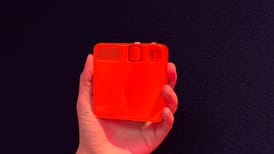
MWg Atom V

By John Chan on 17 October 2008

Though it is basically a solid device at a reasonable price, its 64MB RAM is a bare minimum and sacrifices this smartphones performance.

Editor's rating:7.5 User rating:4.7
  • Good: Quick Menu interface • Built-in GPS • Separate audio jack for headsets • Large navigator and selector • 520MHz processor.
  • Bad: Only 64MB RAM • Horrible stylus • No front-facing camera.
  • Specs: Bluetooth, Wi-Fi (802.11b/g) • GPRS, EDGE, HSDPA • 2-megapixel • microSD • See more specifications
  • RRP: AU$669.00

Mobile and Wireless Group (MWg) is the remnants of the Asia branch of global telecom O2, and the Atom V is the next generation of handset in the O2 Atom line. This iteration has more features and a new design that's not quite like the older models. Does it have the potential to be as successful as the previous devices like the Atom Life?

Design
Design is an important reason the Atom Life was successful, and the Atom V looks to emulate that. Though not razor-thin like so many consumer mobile phones these days, the Atom V is pretty slim, measuring in at just under 15mm, down from the Atom Life's 18mm. There is a bit of sacrifice in the length and width, though. The Atom V has a noticeably larger footprint and does not look as compact as the older Atoms.

Like HTC's Touch series, the entire front surface of the device is flush. This means there is no raised bezel, which makes it better for fingertip actions like scrolling and swiping. We did find the LCD quite far under the clear plastic cover, which makes it difficult to aim at small icons, especially if the screen is placed at an angle from your view. On a related note, the stylus that comes with the Atom V is too short for comfort — MWg should have provided an extendable one.

Below the display is a round directional pad. At first glance, you expect it to be a scroll wheel because of the shape, but unfortunately, it's not. The lack of circular motion doesn't take away from the fact that it's a pretty effective five-way navigator. We especially like that the selector is very large so you can't possibly miss it. Around this navigator are the shortcut buttons. These are thinly shaped but well spaced out so we had no problems with them.

On the left side of the Atom V is the camera shutter, a volume rocker which doubles as another shortcut key and the microSD card slot. Connections-wise, there's a standard mini-USB port on the base and a 2.5mm audio jack for headsets on the right side.

Features
The size of the Atom V doesn't limit what it's able to do and it remains as fully featured as the Atom Life. This includes HSDPA, Wi-Fi and Bluetooth wireless connection options as well as quad-band GSM, a feature that frequent travellers to the US will appreciate. For those who still like to listen to the radio, a tuner is also built into this handheld.

Another feature that globetrotters will like is the inclusion of GPS. This was one feature that gave the HTC P3600i the upper hand when comparing features. The GPS in the Atom V will utilise the tried-and-tested SiRFStar III chipset. It worked well with Google Maps, taking only about a minute to get a lock.

One of the most glaring omissions is the lack of a secondary camera for video calls. Though it is equipped with 3G, there is only one rear-facing camera for still snapshots and video capture.

Though still fast at 520MHz, the Atom V's processor is slower than the Atom Life's 624MHz one. It may not mean a lot to most users, but those switching over from an Atom Life may feel the difference.

Though many handhelds now come with 128MB RAM, the Atom V sticks with 64MB. RAM is temporary memory for running applications, so more of it will make multitasking more efficient. Considering the Atom V runs Windows Mobile 6.0, an operating platform that requires a fair bit of grunt, an increase in memory is something we really regret not seeing in the Atom V.

One of the things we liked about O2 products was the effort taken to customise the software. On the Today screen, this is usually done by adding new rows and shortcuts to make getting to commonly used items more convenient. MWg has taken another step by providing an attractive alternative to the default Today screen in an app named Atom V Quick Menu. This interface features large icons on the bottom of the screen which are meant to be tapped with your fingers. Icons can be removed or added from a comprehensive list and moving between them is intuitively done by swiping your thumb against the row. A big clock is found in the middle of the display, while the top of the screen shows system information and fixed shortcuts to messaging, the phone application and keylock. This is definitely much easier to use than the regular Today screen. But if asked to make a choice, we'd have to say that HTC's implementation is still more comprehensive and useful.

Another useful feature is the Easy-Touch Menu. This can be called up by pressing and holding the Windows key. What it does is to help you easily terminate the application you are in because, as we know, pressing X on the top right corner only minimises them. This will help with RAM management. It also has a shortcut to the brightness setting, making it convenient to adjust the backlight to save power.

Performance
On a single charge of the battery, we got about two days' use. As mentioned earlier, we found RAM lacking on the Atom V. With nothing running in the background, there was only about 22MB of free RAM on our review set. With the Atom V Quick Menu running (which we think most users will leave on by default), there was only 18MB free. The responsiveness of the device felt fine in most normal operation but we did experience some slowdown when more applications were running in the background.

Topics: smart phone, pda, MWg, mobile phone, atom

Other MWg products

Comments (7)

  • Suresh gave 1/10 on 27/07/2009 21:39 Report abuse

    • Good: Not at all good, Suggest everyone not to buy this phone.
    • Bad: MWG Atom V. hangs many time, Finally out of order. Always search for RF signal.

    Less than a year used MWG Atom V. hangs many time, automatic off function inbuilt even during call is running, Finally permanently hang (search for RF signal). Repair cost at service center is 40SGD. Do not go for this. Unprofessional service center.

  • shady gave a review on 06/07/2009 22:04 Report abuse

    • Good: none
    • Bad: everything

    well after phoning the service centre today in Collingwood VIC, they no longer have any relationship with the MWG who went into receivership. There is now no option, but to try to get service through Hong Kong.

  • arjaym gave 3/10 on 24/11/2008 15:46 Report abuse

    • Good: none
    • Bad: Poor battery life. Hangs too often. Shuts down when battery life low.

    Poor battery life. Hangs too often.

  • Micro44sydney gave 5/10 on 26/10/2008 15:25 Report abuse

    I have been a user of O2/MWg XDA and smartphone since 2005 and have come to the conclusions that the product quality, particularly the service from MWg is not acceptable. Below is my real story which I have told MWg that I would share with all of you.

    (1) My story about my XDA:

    I bought an Atom Exec XDA in late 2006 costing me more than A$1000. This XDA never worked properly and it switched off automatically a few times a week and I have consulted with O2 for many times who could not suggest any better way to fix it except updating ROM (note that my XDA used the latest version of ROM). I had to use it in this way.

    After use for 19 months, its built-in speakers and microphone became malfunction (did not work) after I, for the first time, plugged in an ear piece to test its radio. When I called O2 services centre, I was told that they did not support this product any more and might not have parts to repair it (cost more than $1000 and used for 19 months – finished?). I had to bring my XDA to Singapore during my business trip. After spending $48 for checking by MWg service centre (all services are through post/courier or collection points, and I do not know where it was checked), I was told that the motherboard needs to be replaced at a otal cost of S$431 (about the same amount of AUD). I told them many times that it would well be that the switch for the internal speakers and microphone was not in good contact, but they insisted that changing the motherboard was the only option (at $431). I had to decide not to repair the device and paid them $48 for diagnosis.

    During my trip to China in Sept 2008, I told a repairman in a mobile phone service stall about the problem of my XDA. This man spent less than 10 minutes on locating and fixing the problem (cost me about A$1.00).

    I have communicated with MWg about their unprofessional service and advice; they still insisted that their repair option was the best (not that I could can spent less than $500 to buy an out-of-date Atom Exec, but they asked you to spend $431 to repair it).

    (2) Conclusions:
    Think three times before you buy O2/MWg products!

    Statistically, every product has a percentage of chance for failure; for some guys the chance is zero, and for others it is 100%. In my experience, O2/MWg product is less reliable than others that I used (such as Dell and HP). If your O2/MWg product needs service, apart from my experience with MWg as stated above that I suggest you to consider, I would like to remind you that MWg has very few service centres in the world and only one in Australia, and that you may have to send it for service by post or courier.

  • Mild gave 7/10 on 21/10/2008 15:43 Report abuse

    • Good: GPS, slick flat screen, quick menu, expandable memory,
    • Bad: longer than usual phones, wish it had a bundle for a car kit cradle.

    Pretty solid navigation pocket pc, reception is good, no frills with all the programs you actually need, unlike other over priced phones with unnecessary applications.

  • hellboy gave 8/10 on 21/10/2008 15:23 Report abuse

    Cool looking device, stable perfomance and snazzy looking Quick menu UI

  • Y0giBear gave 4/10 on 10/10/2008 15:18 Report abuse

    • Good: Good sleek looking phone, light, perfect size
    • Bad: Not responsive, bad network, poor online manufacturer support, hangs at times

    Been using MWG atom V for 4/5 months now.

Post your own

You must read and type the 6 chars within 0..9 and A..F

You must read and type the 6 chars within 0..9 & A..F

Submit

Enter your personal information to the left, or sign in with your Facebook account by clicking the button below.

Connect

The Explain Series

Where to buy MWg Atom V

See all options »

Must read

Advanced search

Product finder

Recently viewed products